
Introduction:
Let’s kick things off today with an intriguing question: what would you say if I told you Lenovo has created a new lineup meant to fill the gap between the budget-friendly LOQ models and the Legion flagships? Meet the Lenovo Lecco Bellator; an uninvited guest from Lenovo’s new sub-brand that has arrived to shake up the market equations with a “Legion specs, LOQ price” strategy. The mysterious part of this story is that the device is currently an exclusive traveler of East Asian markets and hasn’t yet found its way to the global market, but here at Binoshatech we got our hands on this “budget Legion” to see whether the combination of powerful HX-series processors and a stunning 2.5K display in this new chassis can really shake up the gaming market, or if it’s just a new name. Buckle up, because we’re about to dig into the guts of this strange and wonderful “Lecco Bellator”!
Design and Build Quality; Simple, Sleek, and No-Frills
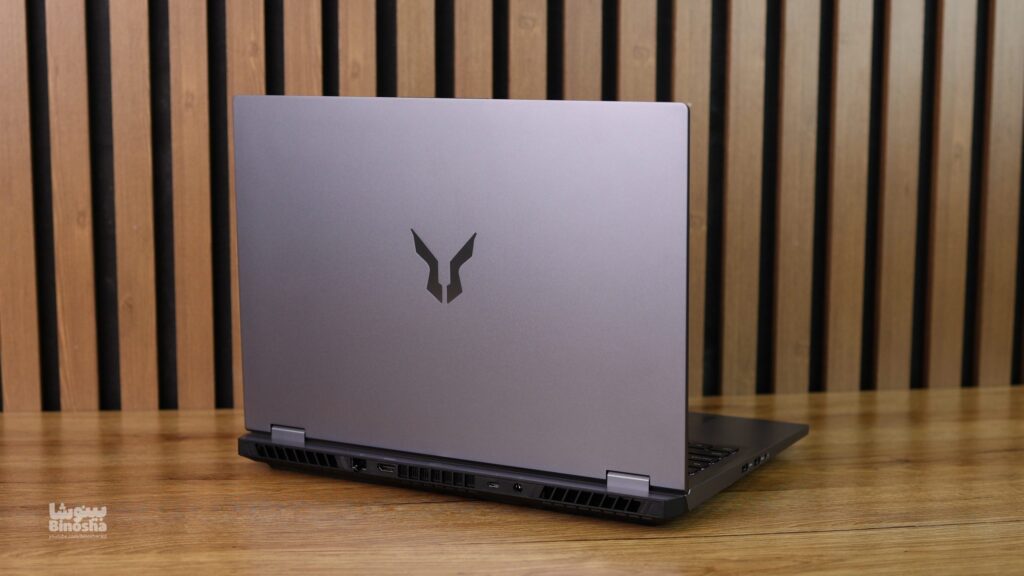
The moment you pull the Lenovo Lecco Bellator out of the box and hold it for the first time, you immediately notice that Lenovo wasn’t chasing unnecessary flash here. There are no wild color options; this device is only produced in matte gray, a color that feels both heavy-duty and classy, and paired with the glossy Bellator logo on the lid, gives off a modern, gaming vibe.
Now let’s get a bit more hands-on. The device’s back panel (the lid behind the display) is made of metal, and when you run your hand over it, you get that cool, sturdy feeling you’d expect from pricier laptops. But once you open the lid, the story becomes a bit more budget-oriented. The interior body and main chassis are made of reinforced plastic, which strongly reminds us of the LOQ series.
Let me be upfront with you; if you press hard on the middle sections of the keyboard or the palm rest, you’ll notice a bit of flex, or Flex. But don’t worry! This is completely normal for gaming laptops in this price bracket and doesn’t mean the build quality is poor; in fact, the chassis feels quite solid and firm under your hand. One of the best features of this design is the matte finish of the body; you no longer need to keep a cloth handy to wipe away fingerprints, since this body stays clean and tidy. The bottom feet are also wide and grippy, designed so that the laptop doesn’t slide around on your desk when you get excited mid-game.

Hinges; Tried and Tested, Flexible
Opening angle: About 180 degrees
Stability: Good
Single-hand opening: Yes
Now let’s talk about the hinges, which have always been the Achilles’ heel of mid-range laptops, but here the story is different. The Lenovo Lecco Bellator‘s hinges perform genuinely smoothly and reliably, and that same Legion-series “DNA” is felt here too. Good news for fans of the “single-hand open test”: yes! The weight balance of the device is well-managed enough that you can easily and elegantly open the lid with one hand, without the bottom of the chassis lifting off the desk.
The next interesting point is the opening angle; these hinges allow the display to fold nearly 180 degrees flat. You might not use this every day, but knowing it’s there gives peace of mind that if the lid is ever pushed back too far, the hinge won’t break.
And now for the most important factor: stability. When the laptop is open, the 16-inch display stands very firmly in place. Even if, like me, you have a habit of pounding the keys while typing or in the middle of intense games, rest assured the screen has no notable wobble, and that annoying “screen wobble” we see in some rivals just isn’t present here. Overall, the hinges are built solid and sturdy, giving you the feel of a quality device.
Dimensions and Portability; A Powerful but Heavyweight Companion
Display size: 16 inches (≈ 40.6 cm)
Thickness: 2.6 cm
Width: 36.0 cm
Depth: 26.0 cm
Total volume: About 2,450 cm³
Laptop weight: 2.1 kg
Charger volume: About 600 cm³
Charger weight: 0.7 kg
Let me put your mind at ease: the Lenovo Lecco Bellator falls squarely into the “semi-portable” laptop category. What does that mean? It means this device isn’t a feather-light ultrabook you can toss in a bag and completely forget about. Weighing around 2.5 kg (without the charger), this laptop is built more to reign over your desk or gaming setup, and only “occasionally” get tossed into a backpack for travel or essential trips.
If you’re a student who wants to carry this device on your shoulder every day from morning to night, your shoulders might complain by the weekend! But for someone commuting between home and work, or traveling every once in a while, it’s completely manageable.
And now, about the charger… There’s an important detail you should know regarding this device’s power adapter. Unlike Legion’s famous rectangular ports, here we’re dealing with a round-tip charger that’s practically a “brick” all on its own! This charger has considerable weight and bulk, and when you add it to the laptop, the total package weight climbs above 3 kg. So my friendly suggestion? If you’re buying this laptop, make sure to get a standard, roomy backpack. Overall, this weight and thickness is the price of having that powerful cooling system and 16-inch display, which in my opinion is well worth it.
Upgradability and Repairability; A Heaven for Tinkerers!
RAM Slots: Two (SO-DIMM)
Storage Slots (Storage Slots): Two (M.2 PCIe Gen 4)
Replaceable battery: Yes
Replaceable wireless card: Yes
Good news for those who like to upgrade their systems to the max: the Lenovo Lecco Bellator gives you free rein! Access to the internal components of this device is genuinely easy and user-friendly. Just remove a few standard Phillips screws underneath the device, then use a guitar pick or a plastic tool to pop off the panel. Fortunately, the screws are “captive” type and won’t get lost, so you don’t need to worry about screws rolling under your desk.
RAM and memory; as much as your heart desires! When you crack open the device’s insides, you’re greeted with a sight that’s becoming increasingly rare these days: two SO-DIMM RAM slots, neither of which is soldered! This means if the current 16GB of RAM isn’t enough for you, you can upgrade to up to 64GB of DDR5 RAM on this device in the future. Lenovo hasn’t skimped on storage either, giving you two M.2 slots, both supporting the high-speed PCIe Gen 4 standard. So if your 1TB drive fills up, instead of deleting games, you can just buy a new SSD and pop it into the second slot. Even the Wi-Fi card is replaceable, so if a new standard comes along someday, you can swap it out.
In the Box
Power adapter: 170W (with round connector)
Inside the box, aside from the device itself and the manuals, there’s only one other important item: the charger. As mentioned in the design section, there’s no sign of Lenovo’s rectangular charging ports (Slim Tip) here; instead, you get a round connector. The included adapter is a fairly large 170W model, which seems sufficient to power the RTX 4060 graphics card and the power-hungry HX-series processors, but if you plan to use the device’s full turbo power, this charger is right at the “edge” and should always stay with you.

Display; An Explosive Strong Point!
Resolution: 2560×1600
Aspect ratio: 16:10
Pixel density(PPI): 188 pixels per inch
Panel type: IPS
Screen-to-body ratio: 89%
Refresh rate: 180 Hz
sRGB: 100%
Adobe RGB: 85%
DCI-P3: 95%
VRR support: Yes (G-SYNC Compatible)
Maximum brightness: 500 nits
Minimum brightness: About 10 nits
Coating type: Matte (Anti-Glare)
Touchscreen: Yes
We’ve reached the section where the Lenovo Lecco Bellator officially knocks out its rivals! When it comes to the display, Lenovo hasn’t held back at all here; it’s as if they took the panel from the flagship Legion series and put it on this affordable device. It doesn’t matter which version (Intel or AMD) you buy, because both benefit from this masterpiece panel. We’re dealing with a 16-inch display with a 16:10 aspect ratio, which gives you more workspace and eliminates the bottom bezels.
Why do we call it explosive? The first thing that catches your eye is the combination of 500-nit brightness with a 2.5K resolution. In this price range, most rivals top out at 300 or 350 nits of brightness, but the Bellator shines like a projector! This means even under strong lamp lighting or bright environments, the image stays perfectly clear and legible, and the matte (Anti-Glare) coating also blocks annoying light reflections.
A Haven for Gamers and Designers The 180Hz refresh rate makes everything, from moving your mouse around Windows to landing headshots in shooter games, feel “buttery” and incredibly smooth. Thanks to G-SYNC support, there’s no screen tearing, and you get a consistent gaming experience. But the real surprise is for designers and editors: this panel not only covers 100% of the sRGB color space, but also supports about 95% of the professional DCI-P3 space! Colors are vivid, deep, and accurate (1500:1 contrast), and reds and greens are displayed in a way that makes them look like they’re popping out of the screen.
Bottom line: If you work in content creation, or you’re a gamer for whom image quality is a matter of life and death, this display is unrivaled in this price range. Lenovo has truly hit it out of the park here and created a major strong point that multiplies the value of buying this device.

Keyboard and Touchpad; Gets the Job Done, But No Frills
Keyboard backlight: Single-zone white (color not adjustable)
Touchpad dimensions: About 120 cm²
Touchpad material: Plastic
In the keyboard department, the Lenovo Lecco Bellator delivers a performance you could call “standard and acceptable.” If you’ve used Lenovo laptops before, the typing feel on this device will be quite familiar to you. The key layout is great, and the good news for gamers is that the arrow keys are full-size and set apart in their own separate section, which is a huge blessing while gaming.
How does the typing feel? Key feedback (tactile response) is medium-to-good, with a suitable amount of key travel. Typing on it is smooth and quiet, and it doesn’t produce that harsh “clack clack” sound. But let’s be honest (as we mentioned in the video review too): this keyboard doesn’t quite match the “magical” typing experience of the Legion series’ keyboards, and some might even find the typing feel of the LOQ series more appealing. One more important note: there’s no light show or RGB here! The backlight is only ice white, which might be disappointing for RGB fans, but it gives the device a minimal, professional look that doesn’t stand out in a work environment either.
Touchpad; just there because it has to be! Now for the touchpad… if I’m being honest, the experience stays exactly within the bounds of the word “average.” We’re dealing with a plastic surface that your finger glides smoothly across, and the Palm Rejection system also works well, so you don’t get errors while typing. But its size isn’t all that large for a 16-inch laptop, and it doesn’t convey a premium feel. That said, let’s be realistic; you’re going to be gaming on this device, so 99% of the time a gaming mouse will certainly be hooked up to it, and this touchpad is only there to get you through casual tasks at a cafe or university.
Speakers, Webcam, and Microphone; Saying Goodbye to 720p!
Max speaker volume: 85 dB SPL
Webcam resolution: 1080p
Face unlock support: No
Webcam; finally, a clear picture! First, let’s talk about that “eye” above the display. In the Lecco Bellator model, Lenovo has finally let go of those old 720p sensors and gone with a 1080p webcam. Thank goodness! Image quality under adequate lighting is genuinely good; facial details are sharp and colors are captured naturally. Of course, like most laptops out there, if the room lighting is low, image noise increases, but for online classes, work meetings, or video calls with friends, it holds up perfectly well. Just keep in mind: there’s no IR sensor here, so we don’t get facial recognition unlock (Windows Hello), and you’ll have to settle for a regular PIN.
Speakers; good, but not for a party! The device’s speakers sit on either side of the keyboard, firing sound directly toward you. If I had to describe them in one phrase: “gets the job done and sounds decent.” The volume (about 85 dB) is plenty for a medium-sized room, and even if you crank the volume all the way up, the sound doesn’t get harsh and retains its clarity. It’s great for watching YouTube, movies, or listening to mellow music. That said, we’re dealing with a mid-range laptop, so you shouldn’t expect thumping, deep bass. If you’re a gamer who wants to precisely hear enemy footsteps, or you love bass-heavy music, you’ll definitely need a good pair of headphones.
Microphone: The device’s dual microphones also perform acceptably. They filter out ambient noise (like the laptop’s own fan noise) reasonably well, so your voice comes through clearly to the other party. In short, for voice calls, you don’t necessarily need to plug in a headset; the built-in microphone gets the job done.

Ports and Connectivity; A Modern-Day Disaster in 2025!
USB-A Ports
3 units, all USB 3.2 Gen 1 (up to 5 Gbps). One of them supports charging connected devices even while powered off.
USB-C Ports
1 unit, USB 3.2 Gen 2 (10 Gbps) with Power Delivery and DisplayPort
Thunderbolt
Not available
USB-C Charging
Not supported (charging only via the dedicated round adapter)
USB-C Display Out
Full support (DisplayPort 1.4)
HDMI
One HDMI 2.1 port with support for 4K@120Hz and 8K@60Hz
DisplayPort
Via the USB-C port
3.5mm Jack
Combo headphone/microphone jack
Card Reader
Not available
Ethernet
One RJ45 port at 1 Gbps
Proprietary Port
Yes (dedicated round charging connector)
Security Lock
Yes (Kensington Lock)
Wi-Fi
Wi-Fi 6E (802.11ax) with 6GHz band. MediaTek or similar adapter for stable, low-latency gaming connections.
Bluetooth
Version 5.3, with low power consumption and reliable connectivity to gaming peripherals.
Let’s start with the glass-half-full view. Lenovo has equipped the Lecco Bellator with a set of “traditional,” gaming-focused ports, which is great for anyone with a bunch of mice, keyboards, and cooling pads. Having three USB-A ports means you don’t need to worry about connecting your older peripherals. There’s also a gigabit LAN port and a valuable HDMI 2.1 port, which lets you output a 4K image at 120Hz to your TV and enjoy it.
But… (and here’s where we raise our voice!) The biggest shock and weak point of this device is having only a single USB-C port! I genuinely don’t understand it; we’re in 2025, when the whole world is moving toward Type-C, and yet Lenovo only included one port? This means if you want to connect a hub or get a second video output, your hands are basically tied, and you’ll have to enter the frustrating world of “dongle life.” Worse still, the SD card reader has also been dropped, so if you’re a photographer or content creator, buying a USB-C hub becomes an absolute necessity for you.
Round charger and wireless connectivity: Another odd detail is the use of the old-style pin (round) charging port. There’s no sign of Lenovo’s famous rectangular sockets or full USB-C charging here, and you’ll always need to carry that 170W brick with you. That said, Lenovo made up for it on the wireless front. The Wi-Fi 6E chipset with 6GHz band and Bluetooth 5.3 makes your connection completely stable and low-latency in online games, so at least you won’t have to worry about ping and lag.

Hardware Details
Processor (CPU); A Bloody Battle Between Red and Blue Team on Lenovo’s Turf
Brand
Intel / AMD
Model
Core i7-14650HX / Ryzen 9 8940HX
Core count
16/16
Thread count
24/36
When we get to the Lenovo Lecco Bellator‘s hardware and processing power, Lenovo has implemented a very smart strategy. Instead of locking the user into a single brand, they’ve opened the competition arena for both chip giants, namely Team Blue (Intel) and Team Red (AMD). This laptop is offered in two completely different configurations, each with its own character and features, but both aiming for the same goal: delivering maximum power.
1. Team Red; Meet the Ryzen Beast (Ryzen 9 8940HX)
The unit we put under the microscope at the Binoshatech studio was equipped with the AMD Ryzen 9 8940HX processor. Let me be blunt: this processor is an “untamable beast.” This chip, with its advanced architecture and combination of 12 cores (including 4 powerful Zen 5 cores and 8 efficient Zen 5c cores) and 24 threads, kicked up quite a storm in the benchmarks. In multi-core tests like Cinebench, the scores we recorded exceeded expectations for a mid-range laptop. If your work involves heavy rendering, compiling lengthy programming code, or running multiple Virtual Machines, this processor is built exactly for you. AMD’s raw power has the final word here, and it also keeps pace with the RTX 4060 graphics card in gaming so no bottleneck forms.
2. Team Blue; Balance and Speed (Core i7 14650HX)
On the other side, there’s the Intel configuration with the Core i7 14650HX processor. This 16-core processor (from the Raptor Lake Refresh HX series) with a 5.2GHz boost clock might sit a bit lower in raw multi-core power compared to its Ryzen rival, but it holds one major trump card: compatibility. Thanks to Intel QuickSync technology, this version delivers faster exports and a smoother working environment for video editors and those working with Adobe software (Premiere, After Effects). Also, in our tests, power management during idle states was slightly more optimized on the Intel version, leading to somewhat better battery life.
The Secret to Stability (Triple-Fan Design)
But the main question here is: how is all this power controlled within a relatively slim chassis? The answer lies in Lecco’s unique cooling system. Unlike 90% of gaming laptops on the market that use two fans, Lenovo has used a triple-fan design (Tri-Fan Cooling) here. The third, smaller fan is directly responsible for cooling the sensitive areas around the GPU and video memory, and it helps with overall airflow. What’s the result of this engineering? In our extended stress tests, the device was able to maintain high clock speeds for longer, with no sudden performance drops (thermal throttling). The body does get warm, but not to a worrying degree, and this stability is exactly what gamers and engineers want.
It doesn’t matter which team you pick; whether it’s the Ryzen 9, the king of raw power and rendering, or the Core i7, the editors’ loyal companion. Both versions deliver performance far beyond their price class, thanks to the triple-fan cooling system. This laptop proves that you don’t have to pay the price of a $4,000 flagship laptop to get top-tier performance. If your priority is “pure performance,” the Lecco Bellator will be one of the best purchases of the year.

Graphics (GPU); Next-Gen Magic in a Budget Body
Brand
NVIDIA
Model
GeForce RTX 4060 Laptop GPU
Dedicated/Integrated
Dedicated
VRAM size
8GB GDDR6
Total Graphics Power (TGP)
115W
In the graphics department, Lenovo decided to make the buyer’s decision easier and skipped the weaker models (like the 4050). All Lecco Bellator configurations, whether Intel or AMD, ship with a single, powerful graphics card: the RTX 4060 Laptop GPU.
Let’s be upfront; we’re dealing with a mid-range laptop trying to fill the gap between the LOQ and Legion. This graphics card is built on the Ada Lovelace architecture and is a big leap over the previous generation. But where’s the real trump card? In AI. Thanks to Frame Generation and DLSS 3.5, this graphics card can generate artificial frames and double game performance! This is exactly the “magic” that makes gaming at a resolution as high as 2.5K possible and enjoyable on this laptop.
Performance in demanding games: You might ask: “Can this graphics card handle 2025’s games?” The answer is definitely yes. In heavy AAA titles like Cyberpunk 2077, Alan Wake 2, or Black Myth: Wukong, if you set things to High and turn on DLSS, you get perfectly smooth frame rates (above 60 fps). Of course, in very busy scenes you might notice a bit of visual artifacting, which is completely negligible. For competitive titles like Valorant or CS2, there’s really no debate; frame rates easily exceed 200, exactly what that 180Hz display craves.
Cooling and 115W power: Here’s the golden detail: this graphics card’s 115W power draw is perfectly matched with the triple-fan (3-Fan) cooling system we praised earlier. Heat is managed well, and there’s no throttling mid-game. The result? A graphics card that always runs at maximum power and never lets you down at the most critical gaming moments. If you’re a gamer looking for a graphics card that will run games at excellent quality for years to come without emptying your wallet, the RTX 4060 in this device is the best possible choice.
RAM; A Speed We Love!
Capacity
16GB
Module count
2 units (SO-DIMM)
Type
DDR5
Speed
5600MHz
Let’s put your mind at ease once and for all: on the Lenovo Lecco Bellator, there are no restrictive policies. Lenovo knows that when you put HX-series processors inside a laptop, you also need to feed them properly. That’s why next-gen DDR5 memory at an incredible 5600MHz frequency is used here. This means the processor never has to wait for data to arrive, and the system never “runs out of breath,” even in the heaviest scenarios.
Unlike many of today’s laptops that solder the RAM to the motherboard and effectively block any upgrade path, Lenovo has respected the user in this model. By opening the back panel, you get full access to two SO-DIMM RAM slots. What does this mean? It means you buy the 16GB version today, which is enough for all of 2025’s games and editing work, but you keep your options fully open for the future. Whenever your projects get heavier, you can upgrade the device’s RAM up to 64GB at a low cost.
The 5600MHz speed makes the Windows environment and running games feel extremely “snappy” and fast. Combining this high speed with easy upgradability turns the Lecco Bellator into a reliable investment for years to come; a device that grows with your needs instead of becoming outdated.
Storage; High Speed and the Blessing of a “Second Slot”!
Advertised capacity
1000GB
Usable capacity
931GB
Drive 1
Samsung PM9A1 or similar NVMe SSD
Remember how excited we got in the RAM section about how open-handed Lenovo was? The good news is that Lenovo has followed the same approach on storage, and addressed one of gamers’ biggest concerns. We worked with the 1TB version in the studio, and I have to say the speed of this device’s PCIe Gen 4 drives is genuinely noticeable. Windows boots up in a fraction of a second, and those long, mind-numbing game loading screens have become a thing of the past here. Even when we were moving large video files around, the transfer speed was so high that we didn’t feel any lag or stutter.
The golden detail, and something that sets the Lenovo Lecco Bellator apart from many rivals, is having two M.2 slots. You might say “so what?” but believe me, in a world where games are hitting 200GB, having only one slot is a disaster! But here, the story is different. You can start out with 1TB right now, and whenever your storage fills up (which happens fast!), instead of needing to reinstall Windows or deal with the hassle of data migration, you can simply buy a new SSD and slot it into the second bay.
Freedom without limits Accessing these slots is a breeze too; you remove a few screws and you’re done. If your budget allows, you can push the device’s capacity to wild numbers like 8TB! True, there’s no hardware RAID here, but honestly, who needs RAID in a gaming laptop when you already have two independent, super-fast drives? In short, if your movie archive is massive or your game library has grown out of control, this laptop welcomes you with open arms.

Performance
Heat and Noise: Silence or Storm? The Cool-Running Challenge
Keyboard temperature at idle: About 32°C
Keyboard temperature under load: Up to 45°C
Fan noise at idle: About 30 dB
Fan noise under load: Up to 50 dB
Power and fan control software: Yes (Lenovo Vantage)
Let’s clear the air right from the start: the Lenovo Lecco Bellator is a powerful gaming laptop, and you can’t bend the laws of physics; so if you’re after absolute silence, you’ve come to the wrong address. But… Lenovo has played a trump card here that turns things around: the triple-fan (Tri-Fan) cooling system.
During everyday tasks like browsing the web or typing, the device is so quiet and calm you might wonder if the fans are even on. But the moment you launch a game, this calm turns into a storm. The subtle but important point here is: the fan noise does get loud, yes, but the character of this sound is more like a “rush of wind” than the sharp, grating whine that files at your brain in some other laptops. It’s true that in very quiet environments it’ll turn heads toward you, but the noise isn’t the kind that gives you a headache.
Fortunately, Lenovo has handed you the reins to this dragon. With the Lenovo Vantage software, you can decide whether it’s time for silence (Quiet Mode) or time for war (Performance Mode).
Heat test: Do our fingers burn? And now for gamers’ most important question: “After two hours of gaming, does my hand get grilled?” The answer is no. The airflow engineering in this device is such that even when the system is using every bit of its power, the keyboard surface temperature (especially around the WASD keys and the wrist rest) stays cool and pleasant, and typically doesn’t go above 45°C. Heat is intelligently routed toward the top of the keyboard and near the hinges, areas your hands don’t touch. In short, the triple-fan system here isn’t just a marketing slogan; it genuinely delivers gamer comfort.

Extra Features; Saying Goodbye to Unnecessary Frills
Biometrics
None
RGB Lighting
Yes (single-color white)
Stylus support
No
Secondary display
None
This device isn’t here to be a “Swiss Army knife” or to wow you with strange, exotic features. Lenovo had a simple philosophy here: “cut the excess, focus on the essentials.”
Back to the days of PINs and passwords! The first place this simplicity (or perhaps shortfall) shows itself is the moment you log into Windows. Unfortunately, there’s no facial recognition sensor (IR) or fingerprint sensor. So forget the convenience of “just look and log in,” and get ready to type your PIN or password every time, like in the old days. Is it secure? Yes. Is it fast? Not as much as Surface devices or pricier laptops.
The next detail that might annoy (or please) some people is lighting. If you love your laptop lighting up like a Christmas tree and turning the room into a rainbow of RGB, the Lecco Bellator will disappoint you. Here we only have ice-white backlighting. You might say “what a shame,” but let’s look at the bright side: this white light gives the device a sleek, minimal, “grown-up” look. That means you can easily carry this laptop to work or university any day, without it screaming “I’m a gamer!”
Just a laptop, nothing more, nothing less And finally, don’t expect any acrobatic moves from this device. The hinges don’t rotate 360 degrees, there’s no touchscreen, and stylus support isn’t available either. We’re dealing with a completely classic, traditional form factor built for one purpose: to sit on a desk and work its hardest for you. So if you’re a designer used to drawing directly on the screen, you’ll definitely need a separate graphics tablet by your side.

Should You Buy It or Not? Final Word…
If we had to sum up everything we’ve talked about in a few sentences, I’d say the Lenovo Lecco Bellator is one of the strangest, yet smartest, products of the year. With this device, Lenovo has essentially placed a “big bet” and executed a formula many gamers and content creators have been waiting for for years: “strip away the cosmetic luxuries, inject pure power.”
Why is this laptop shaking up the market? Until now, you were always stuck in a tough dilemma: either pay a lot of money and buy a Legion to get a good display and strong cooling, or settle for the LOQ series and give up on a bright display and flagship processors. But the Bellator has upended this game. This laptop tells you: “I don’t have a metal body or a ton of ports, but in exchange, I give you the best display and the most powerful processor in my class.”
Who exactly is this device built for? If you’re a serious gamer, video editor, or programmer on a limited budget, but a 500-nit display and heavy processing power are “essential” to you, this laptop is the most unrivaled option on the table for you. In effect, you’re paying your money purely for “frame rate” and “pixels,” not for brand or a luxury chassis. The triple-fan cooling system and complete freedom to upgrade RAM and storage are features that are as rare as diamonds in laptops of this price range.
But who shouldn’t buy it? Let’s not sugarcoat it; having just a single USB-C port is no joke and can be genuinely infuriating. If you’re someone who’s constantly plugging in various gadgets, hubs, a second monitor, and modern accessories to your laptop, or if you’re a student who wants a lightweight device with long battery life to carry in your backpack all day, this model might frustrate you. This device is more like a “compact desktop PC” meant to sit parked on your desk at home and flex its power, not an ultrabook you carry with you everywhere.
Final verdict: If you can look past the plastic body and the lack of ports, the Lenovo Lecco Bellator gives you a package that, in terms of “performance for the price,” no rival dares to come close to. This is a “Legion” in disguise, arrived to change the rules of the game at a “LOQ” price.
Your Comments
You need to log in to your account to comment.
Log in / Sign up